The most useless way to port a macOS app
- 9 minutes read - 1879 wordsI grew up fascinated by projects like GNUStep, Haiku, Etoile, Wine, and ReactOS. Engineering feats, all of them. They reverse-engineer or reimplement entire operating system APIs so that software written for one platform can run on another. And they almost always end up in the same place: impressive technically, starved for contributors, forever chasing a moving target they can never quite catch.
I never liked the state of the Linux desktop either. Not because it’s bad per se, but because it’s fragmented. A KDE app on GNOME looks alien. Firefox rolls its own everything. GTK and Qt will never agree on anything. Every toolkit draws its own widgets, manages its own text rendering, handles its own accessibility story. The result is a desktop that feels like a coalition of independent projects rather than a coherent system.
This project is not going to fix any of that. But it’s an interesting story about how a combination of prior work, Apple open-sourcing key components, and an AI pair programmer led me down a rabbit hole I didn’t plan to enter.
The prior art that made this possible
I’ve been working with wgpu (Rust’s WebGPU implementation) for a while now, building a map renderer for Woosmap. That project taught me the fundamentals: how to manage GPU pipelines, how to do instanced rendering, how to deal with text atlases and glyph rasterization, how to bridge Rust and Swift through UniFFI.
On the Swift side, I had two apps: Tunes, a music player, and Leela, an internal management tool for Woosmap services. Both are SwiftUI apps, both depend on Apple’s frameworks in the usual way.
So one evening, half-curious and half-joking, I fed Claude the source of those projects alongside some context about GNUStep and friends, and typed:
“What would it take to make Tunes build and run on Linux?”
And then things got out of control.
What Claude came back with
The answer was, predictably, “a lot.” But the interesting part was the breakdown. SwiftUI is the main dependency, and SwiftUI is closed-source. But Swift itself is open-source. Swift Foundation is open-source. The Swift Package Manager works on Linux. So the gap is really:
- A SwiftUI implementation (the view hierarchy, state management, layout engine, modifiers)
- Some AppKit shims (NSColor, NSAppearance, the bits that SwiftUI still leans on)
- A rendering backend that isn’t Core Animation or Metal
- A compositor to manage windows, menus, and the desktop chrome
Instead of stopping at “that’s insane, don’t do it,” I kept going. Claude kept going. We started building.
Architecture
The project (codenamed Clone) splits pretty naturally along a language boundary.
Rust does what Rust is good at: GPU work. A wgpu renderer with pipelines for rectangles, rounded rects (SDF-based, because I can’t stop using SDFs apparently), shadows, text via a glyph atlas, and wallpapers. It also runs the window compositor through winit.
Swift does what Swift is good at: UI. A from-scratch SwiftUI implementation (about 50 View types, @State/@Binding/@Environment, ViewBuilder, layout, modifiers), the whole declarative stack. Plus enough AppKit shims to keep real apps happy, a SwiftData reimplementation backed by SQLite, and an IPC protocol over Unix sockets.
UniFFI bridges the two. Each frame, Rust asks Swift for render commands, Swift resolves the view tree into a flat list of positioned primitives, and Rust batches them into instanced GPU draws. It’s the same bridge I use in the map renderer, so at least that part wasn’t new territory.
graph LR
    A["App.body"] --> B["ViewBuilder"] --> C["_resolve()"] --> D["Layout"]
    D --> E["CommandFlattener"] --> F["IPC
    CGFloat → Float"] --> G["Rust batcher"] --> H["wgpu draws"]

    style A fill:#c4a7e7,stroke:#6e6a86,color:#191724
    style B fill:#c4a7e7,stroke:#6e6a86,color:#191724
    style C fill:#c4a7e7,stroke:#6e6a86,color:#191724
    style D fill:#c4a7e7,stroke:#6e6a86,color:#191724
    style E fill:#f6c177,stroke:#6e6a86,color:#191724
    style F fill:#f6c177,stroke:#6e6a86,color:#191724
    style G fill:#9ccfd8,stroke:#6e6a86,color:#191724
    style H fill:#9ccfd8,stroke:#6e6a86,color:#191724
First signs of life
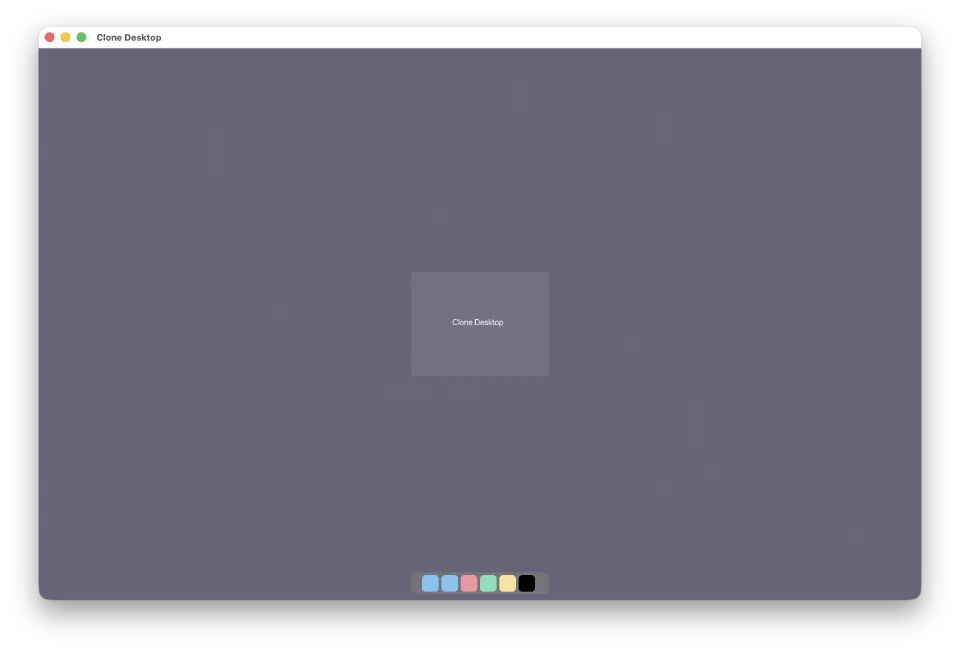
The moment I’ll remember is the grey rectangle. “Clone Desktop” in the center, a dock at the bottom with colored squares. I’d been at it for hours, wrestling with UniFFI bindings and layout math, and suddenly there it was: pixels on screen, drawn by Swift code, pushed through a Rust GPU backend, on something that was decidedly not macOS.
Settings and Finder
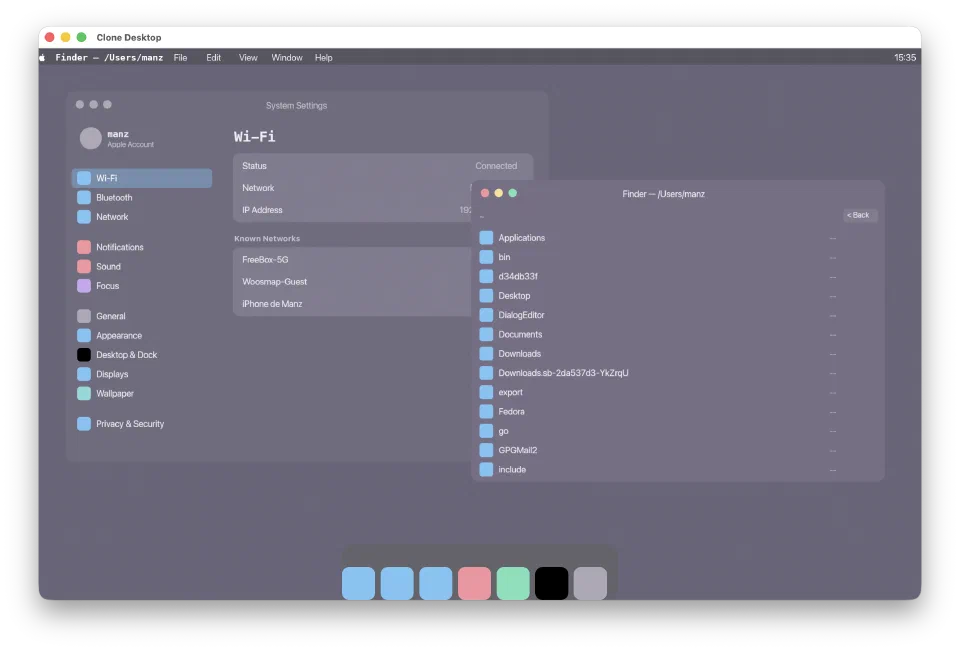
Once the basic views worked (stacks, text, lists, navigation), I needed something real to throw at them. Settings was a natural first target: sidebars, forms, toggles, text fields, the kind of layout variety that breaks things fast. Finder came next because browsing a directory with List and ForEach is such a fundamental SwiftUI pattern that if it didn’t work, nothing would.
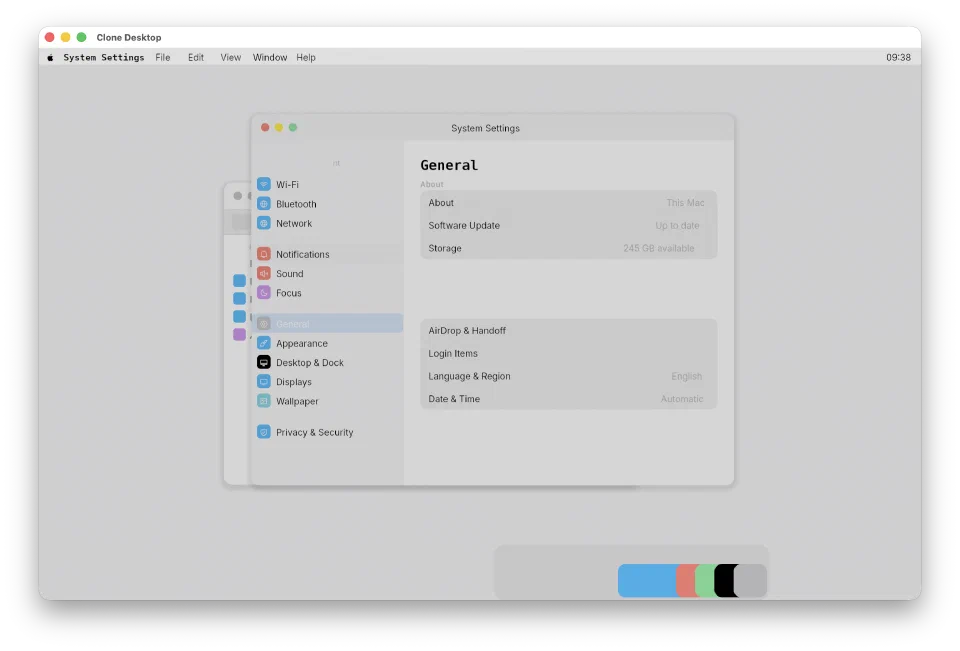
Dark mode just kind of happened. Once I shimmed NSAppearance and implemented the semantic color system (Color.primary, .secondary, the system grays), flipping between light and dark was a toggle. A small thing, but unreasonably satisfying: it made the whole experiment feel like a real desktop for the first time.
Tunes
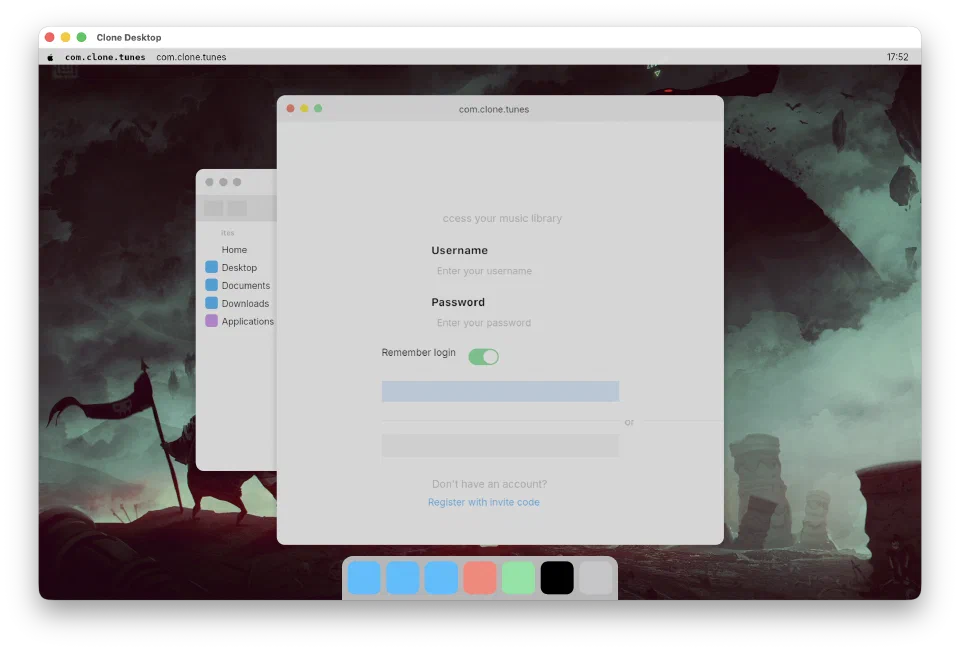
This was the whole point, remember? “What would it take to make Tunes build and run on Linux?” Well, it builds. The login sheet renders inside the app window rather than as a separate NSPanel (a compromise, but not a terrible one), and the SwiftUI code is essentially unchanged. TextField, SecureField, Toggle, Button, Link: they all resolve and render. Same source, different universe.
Leela
Leela is a management dashboard for Woosmap services: tabs, lists, nested navigation, version selectors, deploy queues. Most of the UI is driven by API responses, so it hammers ForEach with dynamic data, @StateObject, and conditional rendering. If Settings was a stroll through the park, Leela was a stress test.
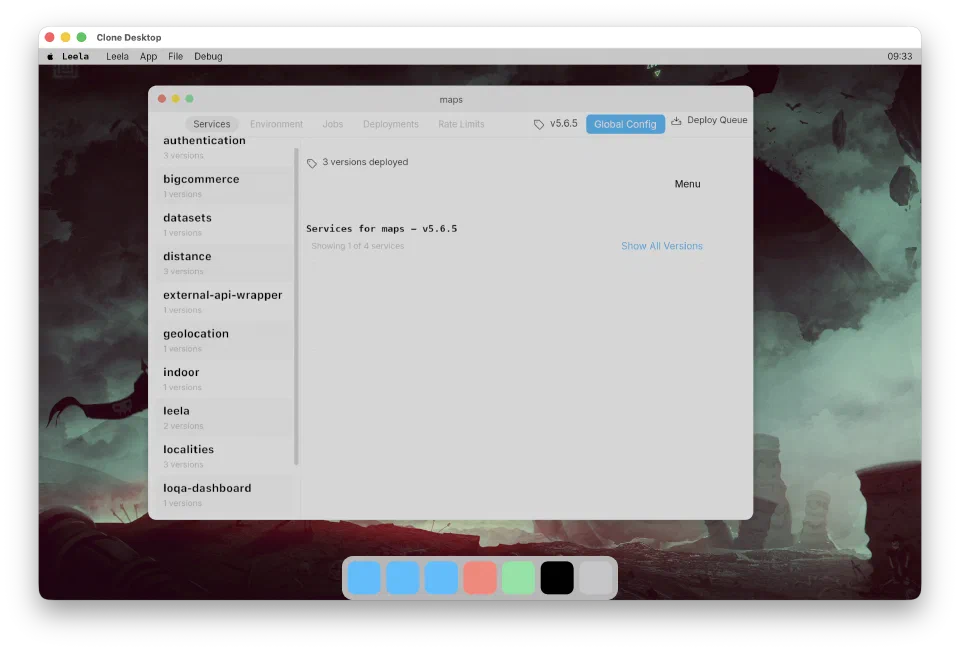
I won’t pretend it was smooth. Getting here meant implementing a surprising amount of SwiftUI’s surface area. The state management system alone (StateGraph, scoped identity for ForEach, call-index disambiguation) went through several iterations where everything would render once and then silently stop updating. The kind of bug where you stare at a diff for an hour before realizing a closure captured a copy instead of a reference.
Under the hood
Text rendering
Text goes through cosmic-text for shaping, then gets rasterized into a 4096x4096 glyph atlas (single-channel, R8). Each glyph is cached and rendered as an instanced GPU quad. Fonts are bundled: Inter for UI text, Phosphor for icons.
This is almost certainly not how Apple does it. A real system would share GPU textures between the compositor and app, or pull from a system font cache. But it works, and there’s a special joy in watching a glyph atlas fill up character by character as the UI renders for the first time.
Layout
I reverse-engineered SwiftUI’s layout by reading objc.io’s thinking-in-swiftui and a lot of trial and error. The model: parents propose a size to children, children report back what they need, parents position them. Sounds simple until ZStack enters the picture: nil-sized views from .background() modifiers would expand to fill constraints and eat space from real siblings. That one took a while.
ScrollView was another head-scratcher: it fills its proposed size but lays out content unbounded in the scroll axis. Getting that inversion right, where the container constrains in one direction and is infinite in the other, broke my mental model twice before clicking.
IPC
Each app is a separate process. The compositor (CloneDesktop) runs the Rust event loop and manages surfaces. Apps connect over a Unix socket at /tmp/clone-compositor.sock and exchange length-prefixed JSON messages. There’s an annoying CGFloat-to-Float conversion at the wire boundary: Swift thinks in 64-bit coordinates, the GPU thinks in f32, and someone has to reconcile that at the border.
The ycodebuild trick
This is probably my favorite hack in the project. To compile an existing macOS app against Clone instead of Apple’s frameworks, ycodebuild generates a shadow SPM package that maps import SwiftUI to Clone’s SwiftUI, import AppKit to Clone’s shims, and so on. The app source code doesn’t change at all: you just build against a different package graph, and the compiled binary talks to the compositor over the socket. The same .swift file, two completely different platforms.
Honest assessment
I should be upfront about the gap between “it renders” and “it works.”
Animations are mostly stubbed. Accessibility is nonexistent. The compositor redraws every surface every frame like it’s 1997. There are // TODO: implement scattered across the codebase where AppKit APIs return no-ops and hope nobody notices. Sheets render in-window because I never built the panel system. The glyph atlas will fall over the moment someone opens a CJK document.
And (this is the awkward part) it doesn’t actually run on Linux yet. The whole premise was “what would it take,” and the answer turned out to include some Apple framework dependencies I haven’t replaced with their open-source equivalents. It’s doable. It’s just not done.
But here’s the thing that caught me off guard. The time from that initial Claude prompt to a state where Tunes and Leela compile and render recognizable UI was hours, not weeks. Not autonomous AI magic (plenty of manual fixes and architectural decisions along the way) but Claude carried an enormous amount of boilerplate: generating 50 View type stubs, wiring up modifier chains, implementing the state graph, setting up IPC. The kind of work that would’ve taken me days of tedious typing, compressed into a conversation.
Why this matters (a little)
Apple open-sourcing Swift and Foundation was a bigger deal than most people realize. Not because anyone’s going to ship a SwiftUI app on Linux tomorrow, but because it lowered the floor for experiments like this from “completely impossible” to “merely impractical.”
The projects I admired growing up (GNUStep, Haiku, Wine) were built by small teams reverse-engineering closed systems over years. The combination of open-source language infrastructure and AI assistance compresses that timeline dramatically. Not to a point where it’s practical or production-ready, but to a point where a single person can explore the shape of the problem in a weekend.
That’s the real takeaway. Not “I ported macOS to Linux.” I didn’t. But I went from a throwaway prompt to colored boxes on screen running real SwiftUI app code, and that felt like something worth writing about.
What’s next
Honestly? Probably nothing. The project scratched a twenty-year itch. But I know myself, and I know there’s a Kawase blur pipeline sitting unused in the renderer that’s going to call my name at 11pm some Tuesday. If I do keep going:
- Per-window offscreen textures: the compositor shouldn’t redraw everything every frame, that’s embarrassing
- Glassmorphism / backdrop blur: because what’s the point of reimplementing macOS if you can’t have the frosted glass
- Actually running on Linux: the whole original premise, still unfinished
- Shared GPU textures: how a real compositor would work, instead of copying pixels through a socket like an animal
Or maybe it stays as a weekend experiment and a blog post. Either way, the kid who thought GNUStep was the coolest thing ever is pretty happy right now.