Tree: a browser that remembers where you came from
- 6 minutes read - 1235 wordsEvery browser has tabs. Linear, flat, disposable. Open thirty of them researching one topic and they sit in a row with no indication that twelve of them came from the same Wikipedia article. Close the wrong one and the context is gone.
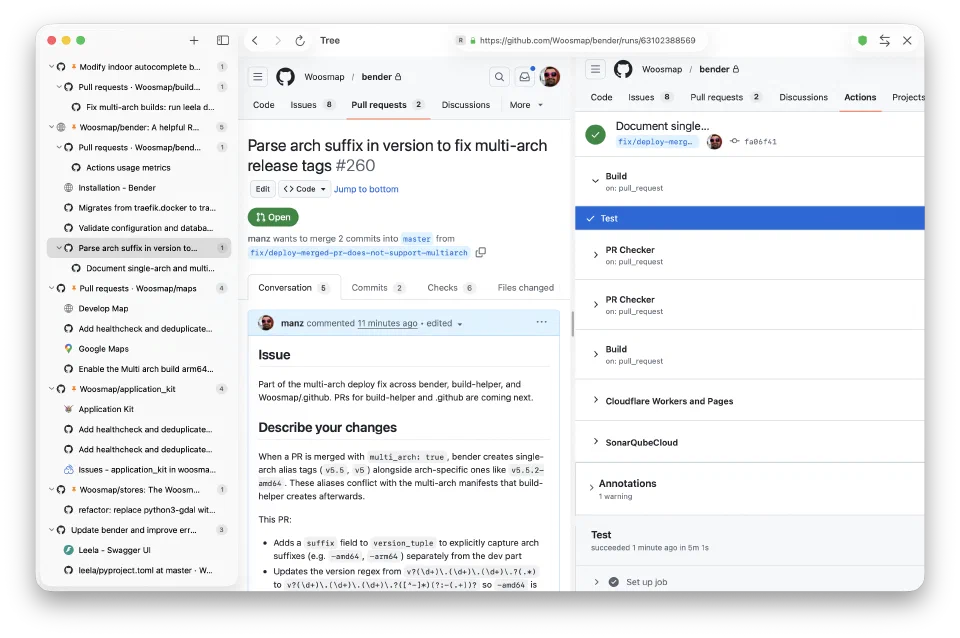
Tree is a macOS browser that replaces tabs with a tree. Every page knows its parent. Cmd+Click a link and it becomes a child node of the current page. The sidebar shows the full hierarchy: research paths branch naturally, and you can always trace back to where you started.
The data model
The core is a SwiftData model with a self-referential parent-child relationship:
@Model
final class TreeNode {
    #Unique<TreeNode>([\.nodeId])

    var nodeId: UUID
    var url: URL
    var title: String
    var faviconData: Data?
    var timestamp: Date
    var lastUsedAt: Date = Date()
    var weight: Int
    var isPinned: Bool
    var sortOrder: Int = 0

    @Relationship(inverse: \TreeNode.children)
    var parent: TreeNode?

    @Relationship(deleteRule: .cascade)
    var children: [TreeNode]
}
The cascade delete rule means pruning a node takes its entire subtree with it. No orphans. The parent/children relationship is bidirectional. SwiftData maintains both sides automatically through the inverse parameter.
Each node tracks a weight that increments on every visit, and an isPinned flag. These feed the search ranking:
var searchRank: Int {
    (weight * 2) + (isPinned ? 100 : 0)
}
Pinned nodes get a massive boost. Frequently visited pages float to the top. It’s a simple heuristic but it works: the pages you care about surface first.
Branching
The key interaction is branching: Cmd+Click a link and the browser creates a child node instead of navigating away. The parent shifts to the secondary panel, and the child becomes the primary:
func selectFromBranch(_ child: TreeNode) {
    secondaryNode = primaryNode
    primaryNode = child

    child.incrementWeight()
    updateWebViewVisibility()
    saveLastSession()
}
This is where the tree structure pays off. You’re reading documentation, Cmd+Click a linked API reference, and now you see both side by side: the original page on the right, the reference on the left. The sidebar shows them as parent and child. Navigate back up the tree anytime with keyboard shortcuts.
Pinned nodes take this further. When a node is pinned, all navigation from it creates children, not just Cmd+Click. Pin your project’s docs landing page and every link you follow branches automatically, building a research tree without any extra effort.
WebView management
A browser can’t keep unlimited WebViews in memory. Tree uses an LRU cache that caps active WebViews at a configurable maximum (default 4):
private func evictIfNeeded() {
    while activeWebViews.count >= maxActive {
        if let toEvict = accessOrder.first(where: { !visibleNodes.contains($0) }) {
            deallocate(toEvict)
        } else if let toEvict = accessOrder.first {
            deallocate(toEvict)
        } else {
            break
        }
    }
}
The eviction prefers invisible nodes. If both panels are showing WebViews, those are protected: the cache evicts the least recently accessed node that isn’t currently on screen. Only when everything is visible does it fall back to strict LRU order.
Before eviction, the WebView’s full browsing state gets persisted to disk.
State persistence
WebKit exposes interactionState, an opaque object that captures a WebView’s entire browsing state: history stack, scroll position, form data. Tree archives this to Application Support whenever a WebView is evicted, the app backgrounds, or the user closes a panel:
func saveState(of webView: WKWebView, for nodeId: UUID) {
    guard let state = webView.interactionState else { return }

    let data = try NSKeyedArchiver.archivedData(
        withRootObject: state,
        requiringSecureCoding: false
    )
    let fileURL = stateFileURL(for: nodeId)
    try data.write(to: fileURL, options: .atomic)
}
When a node is revisited and needs a fresh WebView, the manager restores the archived state instead of loading the URL from scratch. The page appears exactly where the user left it: same scroll position, same back/forward history. The user never notices the WebView was recycled.
A cleanup pass on launch removes orphaned state files for nodes that no longer exist in the database.
The sidebar
The sidebar is a recursive SwiftUI tree. Session roots (nodes with no parent) appear at the top level. Each node with children renders as a DisclosureGroup with nested TreeNodeRow views:
@Query(filter: #Predicate<TreeNode> { $0.parent == nil })
private var sessionRoots: [TreeNode]

private var displayedNodes: [TreeNode] {
    let nodes = navigationState.contextualRoot?.children ?? sessionRoots
    return nodes.sorted { a, b in
        if a.isPinned != b.isPinned {
            return a.isPinned
        }
        return a.sortOrder < b.sortOrder
    }
}
Pinned nodes sort to the top. Below that, manual sort order (set via drag-and-drop reordering) controls the sequence.
Drag-and-drop also handles reparenting: drag a node onto another node and it becomes a child. The drop handler checks for cycles (you can’t drop a parent onto its own descendant) by walking up the target’s ancestry chain:
private func isDescendant(of ancestorId: UUID) -> Bool {
    var current: TreeNode? = node.parent
    while let parent = current {
        if parent.nodeId == ancestorId { return true }
        current = parent.parent
    }
    return false
}
Focus mode
A deep tree gets unwieldy. Focus mode lets you temporarily treat any node as the root: the sidebar shows only its children, and a breadcrumb bar at the top shows the path from the true root:
func focusBreadcrumbs() -> [TreeNode] {
    guard let root = contextualRoot else { return [] }
    var path: [TreeNode] = []
    var current: TreeNode? = root
    while let node = current {
        path.insert(node, at: 0)
        current = node.parent
    }
    return path
}
Click any breadcrumb to re-focus at that level, or click the home icon to unfocus entirely. The focus state persists across restarts via UserDefaults.
Ad blocking
Rather than building content blocking from scratch, Tree loads the full Ghostery browser extension via WebKit’s WKWebExtensionController API. Every WebView gets the extension controller attached to its configuration:
configuration.webExtensionController = WebExtensionManager.shared.controllerThis gives you enterprise-grade tracker and ad blocking with zero maintenance. Ghostery handles its own filter list updates, UI (accessible via a toolbar popover), and persistent storage. The browser just loads the extension at startup and grants permissions.
Keyboard navigation
Tree navigation is keyboard-driven. The tree structure maps to directional shortcuts:
| Shortcut | Action |
|---|---|
Cmd+Shift+Up | Go to parent node |
Cmd+Shift+Down | Go to first child |
Cmd+Shift+Left | Previous sibling |
Cmd+Shift+Right | Next sibling |
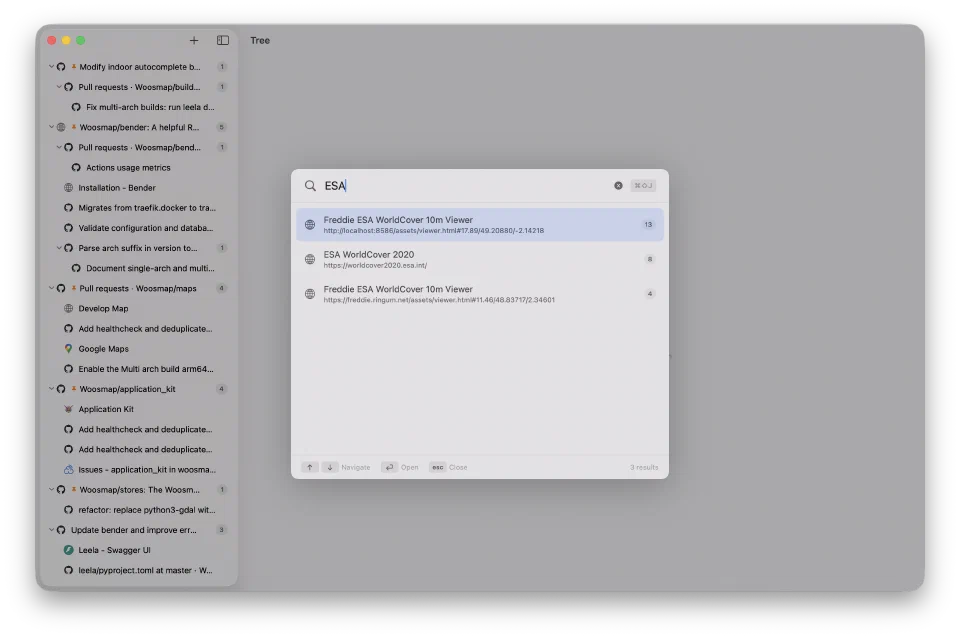
Cmd+Shift+J | Quick search overlay |
Cmd+T | New session |
Cmd+W | Close panel |
Cmd+Shift+W | Prune node and subtree |
The spatial metaphor works because the sidebar is a tree. Up means parent. Down means child. Left and right move between siblings. Once the mapping clicks, you rarely need the mouse for navigation.
Session restoration
On launch, the app restores the last active primary and secondary nodes, plus the focus state, from UserDefaults:
func restoreLastSession(from nodes: [TreeNode]) {
    let defaults = UserDefaults.standard
    let primaryIdString = defaults.string(forKey: Self.lastPrimaryKey)
    let secondaryIdString = defaults.string(forKey: Self.lastSecondaryKey)
    let contextualRootIdString = defaults.string(forKey: Self.contextualRootKey)

    // Match UUIDs to loaded TreeNodes and restore state...
}
Combined with WebView state persistence, a restart puts you back exactly where you were: same pages, same scroll positions, same split view layout, same focused subtree.
What it replaces
The thing it replaces isn’t another browser. It replaces the workflow of opening a dozen tabs, losing track of which ones are related, and eventually closing them all because you can’t remember what you were doing.
With Tree, the context is the structure. A research session about some API has the docs page as the root, the getting started guide as one branch, the API reference as another, and Stack Overflow answers as leaves. Close the app, come back tomorrow, and the tree is still there, with every page exactly where you left it.